

Canopy Connect Update Shows Clients Every Way to Share Insurance Info
Canopy Connect, the insurance data intake platform used by more than 20,000 insurance agents, has added a new sharing path page to Link Flows, a feature of its insurance data intake platform.
Insurance prospects are now presented with a choice of how they want to share their information before they begin the intake process. Options include connecting directly to their carrier account, uploading a declarations page or insurance document, completing a form manually, or requesting a phone call from their agent.
Previously, prospects who received a Canopy Connect link were taken directly into the carrier connection flow. While the platform has supported document upload and forms as alternative and complementary intake methods for some time, those options weren’t visible to clients upfront—leading some prospects to abandon the process when the carrier connection screen felt unfamiliar or unclear.
“Not every client wants to share their insurance information the same way,” said Tolga Tezel, founder and CEO of Canopy Connect. “Some want to connect their carrier account. Some would rather upload a dec page. Others prefer a form. And some just want you to call them. We built this because our customers told us they needed it—and now their clients have a clear, simple choice.”
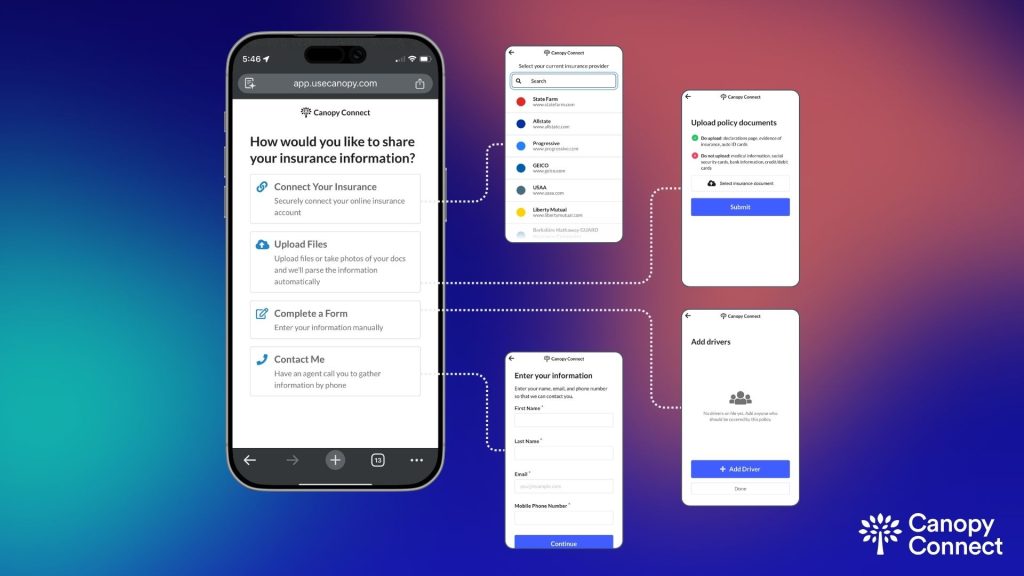
Agencies control which sharing paths are visible within each flow. For existing flows, the sharing path page is disabled by default to avoid disrupting current configurations; it can be enabled in Flow Builder under the Login section. New flows will have it enabled by default going forward.
Canopy Connect describes the update as a direct response to customer feedback from agencies that observed clients hesitating or dropping off at the first step of the intake process.
Learn more about Canopy Connect’s insurance data intake platform at usecanopy.com.